199. System Signal
The system_signal monitors various vehicle system signals and raises an issue when a signal remains in a specific, user-defined state.
This framework is designed to be extensible, allowing users to monitor both standard vehicle indicators and custom properties.
The modifier contains three example checkers:
lights_signals_checker: Monitors the vehicle's turn signals.hazard_lights_checker: Monitors the vehicle's hazard lights.additional_properties_checker: Monitors a custom signal from the vehicle's additional_properties list, which is useful for evaluating proprietary or non-standard system data, often from log replay scenarios.
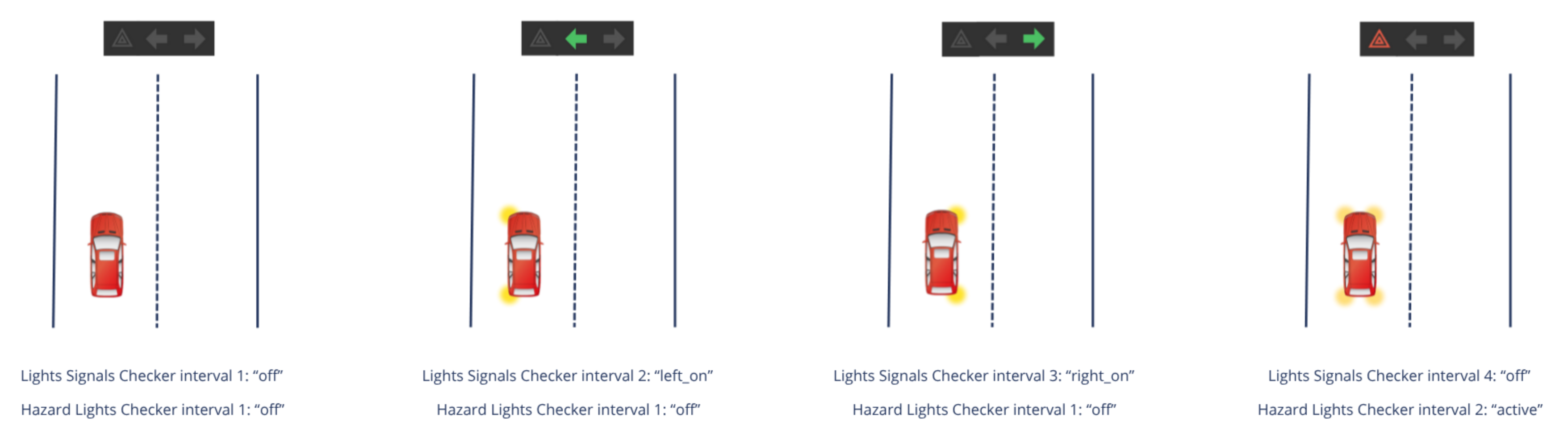
A new interval is triggered each time a monitored signal enters one of the configured signal_states and continues until the signal transitions to another state. The lights_signals_checker and hazard_lights_checker use the vehicle.state.vehicle_indicators struct to retrieve information on the vehicle's sensors. The additional_properties_checker should use the vehicle.state.additional_properties list, so the signal_name parameter must match one of the items in this list.
The signal_states list varies according to the monitored signal, and is user-customizable. The checkers will raise an issue when the state is in the issue_states list, which is the list of states that raise issues when entered and also user-customizable. The severity of the raised issues (issue_severity) is also user-customizable.
The user can configure whether a checker is enabled by default by setting the enable parameter accordingly.
199.0.1 Start condition
The system_signal monitors the signals at each top.clk. An interval begins when a signal's current state is found within the configured signal_states list and continues until the signal transitions to another state.
199.0.2 End condition
An interval is closed as soon as the signal's state changes or is no longer a member of the configured signal_states list. The while_w construct automatically terminates the interval when the trigger condition is no longer met at the next top.clk.
199.1 Plot
199.2 Attributes
The following attributes define the behavior and characteristics of the evaluator.
| Checker attribute | Description |
|---|---|
| Parent object | vehicle.system_signal |
| Issue category | sut or other |
| Issue kind | system_signals, signal_not_found, multiple_signal_names_found, empty_signal_states_list, unknown_signal_state |
| Default severity | ignore, warning |
| Trigger condition | Based on while_w watcher |
199.3 Configuration parameters
The following parameters can be configured to customize the evaluator's behavior.
| Parameter | Type | Unit | Description | Default Value | Range |
|---|---|---|---|---|---|
signal_name |
string | Name of the signal to monitor | No default | ||
signal_states |
list | A list of available signal states to monitor | No default | ||
issue_states |
list | A subset of signal_states that raises an issue | No default | ||
issue_severity |
enum (ignore, info, warning, error_continue, error, error_stop_now) |
Severity of issue | No default | ||
enabled |
bool | Whether the checker is enabled by default in all scenarios or not | true |
199.4 Metrics
The following metrics are recorded and tracked by the evaluator.
| Metric | Type | Description | Range | Unit |
|---|---|---|---|---|
system |
string | The system monitored by the checker | ||
system_state |
string | The state that the system was on during the interval |
199.5 Log and Error Messages
| Output Condition | Description | Default Severity | Action |
|---|---|---|---|
If the signal's state is not found in the list of configured signal_states |
Signal signal_name_lights_signals has a value of current_state_lights_signals, which is not defined in the provided signal_states configuration |
Warning | Investigate the signal_states configuration to include the missing state. |
| If the checker's triggering conditions are met and the signal's state is in issue_states | Vehicle had its turn signal lights current_state_lights_signals |
Warning | Investigate the SUT's behaviour. |
If the list of configured signal_states is empty |
The provided signal_states configuration for lights_signals_checker is empty | Warning | Investigate the signal_states configuration to include at least one state. |
If the signal's state is not found in the list of configured signal_states |
Signal signal_name_hazard_lights has a value of current_state_hazard_lights, which is not defined in the provided signal_states configuration |
Warning | Investigate the signal_states configuration to include the missing state. |
| If the checker's triggering conditions are met and the signal's state is in issue_states | Vehicle had its hazard lights current_state_hazard_lights |
Warning | Investigate the SUT's behaviour. |
If the list of configured signal_states is empty |
The provided signal_states configuration for hazard_lights_checker is empty | Warning | Investigate the signal_states configuration to include at least one state. |
If the signal's state is not found in the list of configured signal_states |
Signal signal_name_additional_properties_checker has a value of current_state_additional_properties_checker, which is not defined in the provided signal_states configuration |
Warning | Investigate the signal_states configuration to include the missing state. |
If the signal's state is not found in the list of configured signal_states |
The specified signal (signal_name_additional_properties_checker) is not available in the Ego's protobuf data |
Warning | Investigate Ego's protobuf data to include the missing signal. |
If the signal's state is not found in the list of configured signal_states |
The specified signal (signal_name_additional_properties_checker) has multiple instances in the Ego's protobuf data |
Warning | Investigate Ego's protobuf data to remove the duplications. |
| If the checker's triggering conditions are met and the signal's state is in issue_states | Vehicle had its signal_name_additional_properties_checker current_state_additional_properties_checker |
Warning | Investigate the SUT's behaviour. |
If the list of configured signal_states is empty |
The provided signal_states configuration for additional_properties_checker is empty | Warning | Investigate the signal_states configuration to include at least one state. |
199.6 Usage
199.6.1 How to instantiate
The system signals framework is built into the Ego only, via global modifier sut_vehicle.system_signal.
It contains three checkers:
lights_signals_checker— monitors turn signals (vehicle_indicators.turn_signal_state)hazard_lights_checker— monitors hazard lights (vehicle_indicators.hazard_lights)additional_properties_checker— monitors a custom protobuf property (additional_properties, matched bysignal_name)
You do not instantiate the checkers with constructor parameters in scenario OSC.
199.6.2 Set parameters at instantiation time
Each checker has its own system_signals_checker_config instances in ftlx_global_eval_config:
ego_light_signals_checker_config— turn signals (default: monitor only,issue_severity= ignore)ego_hazard_lights_checker_config— hazard lights (default: issue onactive, severity warning)ego_additional_properties_checker_config— custom signal (default: disabled, example signalocclusion)
199.6.3 Define and use a custom parameter set
Apply a custom config globally
To customize a checker for all scenarios, create a config instance and apply it via ftlx_global_eval_config. The following example customizes the hazard lights checker.
Create a config instance:
const custom_hazard_config: system_signals_checker_config = new
set custom_hazard_config.signal_name = "hazard_lights_status"
set custom_hazard_config.signal_states = ["active", "off"]
set custom_hazard_config.issue_states = ["active"]
set custom_hazard_config.issue_severity = error
set custom_hazard_config.enabled = true
extend ftlx_global_eval_config:
    set ego_hazard_lights_checker_config.signal_states = custom_hazard_config.signal_states
    set ego_hazard_lights_checker_config.issue_states = custom_hazard_config.issue_states
    set ego_hazard_lights_checker_config.issue_severity = custom_hazard_config.issue_severity
ftlx_global_eval_config.ego_hazard_lights_checker_config. Use the analogous
ego_light_signals_checker_config and ego_additional_properties_checker_config for the other checkers).
Customize per scenario To override fields for a specific scenario, extend the modifier directly. The fields are bound to the config by default:
extend sut_vehicle.system_signal:
    keep(issue_states_hazard_lights == ["active"])
    keep(signal_states_lights_signals == ["off", "left_on", "right_on", "unknown"])
199.6.4 Disabling the checker
-
To disable a single checker:
extend ftlx_global_eval_config: set ego_light_signals_checker_config.enabled = false -
To disable the checkers at runtime:
extend sut_vehicle.system_signal:
    on @start:
        override(lights_signals_checker, run_mode: freeze)
        override(hazard_lights_checker, run_mode: freeze)
        override(additional_properties_checker, run_mode: freeze)
199.7 Additional information
All parameters are required, but you don't need to customize all of them.
For any parameter you don't customize with set, the default value defined in system_signals_checker_config is used.
The modifier can raise the following issues.
| # | Issue kind | Description |
|---|---|---|
| 1 | system_signals |
Base issue raised when a signal's state matches one of its designated issue_states |
| 2 | signal_not_found |
Warning raised when the signal to be monitored could not be found in the vehicle's protobuf data |
| 3 | multiple_signal_names_found |
Issue raised when multiple properties with the same signal name were found |
| 4 | empty_signal_states_list |
Warning raised when an empty list of states to be monitored was inherited from the configuration |
| 5 | unknown_signal_state |
Warning raised when a signal's state does not match any of its specified possibilities inherited from the configuration |