103. Introducing the Evaluation Pipeline
The Evaluation Pipeline is a structured, multi-stage process designed to assess and analyze data gathered during scenario evaluations. It plays a central role in achieving unified coverage within the Foretify ecosystem by applying the same evaluation scenarios and metrics to both synthetic (simulation-generated) and real-world (log) data. This ensures consistent, comparable insights across all testing platforms.
103.1 Step-by-step flow of the Evaluation Pipeline
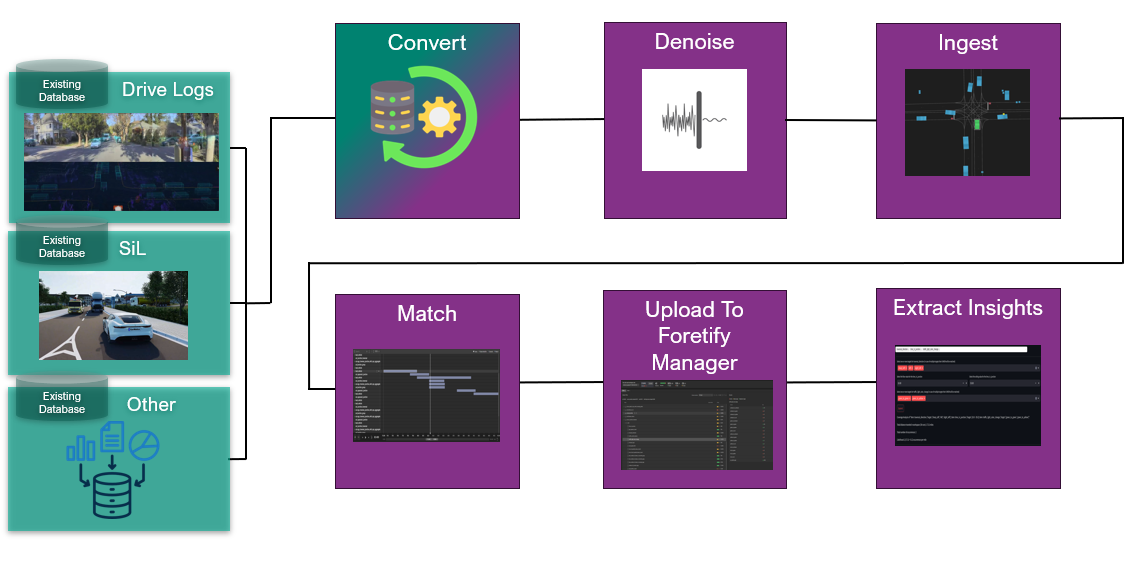
The pipeline runs an ordered sequence of stages. Only explore is mandatory;
the others are optional, so you include just the stages your evaluation needs.
A typical end-to-end run uses the following stages:
- explore — discover the data files (map, external matches, video) associated with each recording.
- parse — convert the raw recording into the Foretellix object list format.
- denoise — clean and resample the object list so events are detected consistently.
- map — make sure a usable map is available to the downstream Foretify stages.
- ingest — load the object list into a Foretify run against the reference map.
- match — search the ingested run for occurrences of the evaluation scenarios.
- ext_match — enrich the run with match intervals supplied from an external source.
- post_match — run additional coverage metrics and checkers over the matched run.
- post_process — run a custom post-processing step over the results, such as report generation.
The sections below describe each stage. For how to enable and configure the stages, see [Configuring the flow][Configuring the evaluation pipeline flow].
103.1.1 Explore
The explore stage inspects each recording and locates the data files associated with it — the map, external match data, and video. Anything you do not pin explicitly in the input list is discovered here, so the later stages know exactly what to work with. This is the only mandatory stage and always runs first.
103.1.2 Convert data
The parse stage converts raw log data into the Foretellix object list format to ensure consistency and compatibility for further processing. The log data is most often recorded during physical test drives, but it can also be the output of virtual testing, such as software-in-the-loop or hardware-in-the-loop simulations.
Unified Data Model
The evaluation pipeline is designed to be agnostic to the data source, whether from real-world logs, Software-in-the-Loop (SiL), Hardware-in-the-Loop (HiL), or synthetic/generative scenarios. All data is converted into a common object list format (protobuf), allowing consistent ingestion, denoising, matching, and metric extraction.
The evaluation pipeline can ingest both synthetic (simulation) and real-world (log) data, converting them into a unified object list format. Using the same evaluation scenarios, the system identifies when and how each scenario is exercised in all test runs, extracting and aggregating key performance indicators (KPIs) and coverage metrics in a standardized way.
103.1.3 Denoise the collected log data
Denoising is applied based on shared configuration, ensuring that artifacts, noise, or errors inherent to any data source are addressed in a consistent way. This maintains data integrity and allows for the reliable detection of events or behaviors regardless of input origin.
For example, sensor noise from real-world runs (e.g., GPS drift) and simulation artifacts are processed with the same denoising settings, ensuring events like vehicle cut-ins are recognized and compared accurately across all modalities.
103.1.4 Map
The map stage ensures a usable map of the drive area is available to the Foretify stages that follow. It uses a map already supplied with the data, and — where configured — can generate or download a map instead. A consistent reference map lets the ingestion and matching stages place actors and objects accurately. When the data already comes with a suitable map, you can omit this stage.
103.1.5 Ingestion
The ingestion step processes the denoised data, mapping actors and objects to a reference map and prepares them for scenario evaluation. This ingestion pipeline is identical for all incoming data, ensuring consistent conditions for scenario matching.
103.1.6 Matching
The ingested data is evaluated against standardized evaluation scenarios which define the patterns or events to search for. The matching step searches the ingested log for occurrences of match scenarios. Every instance found is captured as an interval.
When match intervals are produced by an external source rather than the matcher, the optional external matching (ext_match) stage enriches the run with that externally provided match data.
103.1.7 Post-match analysis
The optional post-match stage runs additional coverage metrics and checkers on the matched run. It computes the final KPIs and coverage data for each matched scenario, ready to be analyzed and compared.
103.1.8 Post-processing
The optional post-processing stage runs a custom step over the results — for example, generating a report or exporting data in a project-specific format. It is the extension point for project-specific output and runs after all other stages.
103.1.9 Result analysis
All matching results and metrics are uploaded to Foretify Manager, which aggregates, visualizes, and enables comparison of scenario coverage and KPIs across all datasets and runs, resulting in unified outputs such as histograms, heatmaps, and trend analyses.
By aggregating and visualizing scenario coverage across sources, the Evaluation Pipeline highlights areas where certain conditions or scenario combinations are under-tested, for example, specific weather or time-of-day situations. This allows informed prioritization of new scenario generation and focused testing on areas most relevant for safety and regulatory requirements.
You can use the run debugger to visualize the recorded behavior, and view and explore intervals indicating matched scenarios. You can view coverage collected for a specific run or a group of runs combined in a workspace. Additionally, you can compare coverage obtained from logs with simulation-based coverage. Some important uses include comparing the combined simulation and real life coverage with the Operational Design Domain (ODD) as modeled in a Verification Plan (VPlan), as well as looking for missing coverage on either modality that will be used to tune the verification effort.
103.1.10 Unified coverage
The unified coverage model allows the pipeline to identify redundant tests (those not contributing new coverage), enabling test suite minimization and more efficient allocation of computing resources. Coverage results drive the automated generation of new test scenarios targeting identified gaps, then re-use the evaluation pipeline to confirm those gaps have closed.
103.2 Examples of Evaluation Pipeline in action
103.2.1 Example of scenario evaluation
Users invoke the same evaluation scenarios to systematically identify scenario matches in any input data. Coverage metrics — such as ODD (Operational Design Domain) parameters, scenario-specific KPIs, and global metrics — are extracted identically regardless of the data source. This enables direct comparison and aggregation of coverage results.
For example, suppose a team wants to know how well their AV system is covered for "unprotected left turns at traffic-light-controlled intersections".
The evaluation pipeline processes both simulation results and logs from deployed fleets:
- Both synthetic runs and real-world logs are ingested, denoised, and evaluated using a passive evaluation scenario for "unprotected left turn."
- The matcher finds all intervals matching the scenario, and metrics like number of lanes, ego speed, and time-to-collision are collected for each match.
- Foretify Manager displays a unified coverage histogram, showing, for instance, that simulations achieved coverage for 85% of ODD variations, but real-world data provided only 60%.
- The user identifies specific gaps (e.g., left turns in rain at night are underrepresented) and generates targeted synthetic scenarios to address them. The pipeline is then re-run to verify coverage closure.
103.2.2 Example of scenario matching and metric extraction
To compare scenario coverage before and after a software stack update:
- Evaluation scenarios are run over logs collected pre- and post-update, as well as simulation runs tailored to new stack features.
- Foretify Manager supports comparing coverage across multiple "timeline points" (TLPs), showing cumulative and differential coverage (e.g., histogram bars for each scenario-ODD bucket across TLP1 and TLP2).
- Unified coverage reveals whether new edge cases are now being detected or whether regressions (lost coverage) have occurred in certain ODD segments.
103.2.3 Example of comparing scenario coverage and safety metrics across different software releases
The evaluation pipeline implements unified coverage to detect regressions and maintain traceability when comparing scenario coverage and safety metrics across different software releases and data sources.
For example, suppose an autonomous vehicle development team has released an updated perception module, and wants to ensure that this update does not introduce safety regressions, i.e., that previously tested and covered scenarios still meet safety criteria.
This is how the Evaluation Pipeline could be used:
-
Historical baseline creation: The evaluation pipeline runs evaluation scenarios on both real-world log data and simulation runs from the previous software release, generating a comprehensive baseline coverage map. This map documents which scenario/ODD combinations were exercised, and the associated safety KPIs attained.
-
Post-update re-evaluation: After the perception module update, the team reruns the evaluation pipeline on new logs (if available) and new simulation outputs, using the same unified scenario definitions and KPIs.
-
Direct cross-release comparison: Because the evaluation pipeline enforces a unified coverage model, all scenario coverage and KPI data, regardless of source or release, are directly comparable. The team can perform side-by-side or overlay analysis in Foretify Manager, visualizing precisely which areas have gained, lost, or maintained coverage or safety performance.
-
Regression flagging and investigation: If the unified coverage view indicates that a specific scenario-ODD bucket (e.g., "overtaking in medium rain during dusk") previously met safety criteria but now shows failures or is not covered, automated workflows can flag this as a regression. The team can then retrieve the exact runs and metrics involved — including the input source (simulation or log), parameter values, and event traces.
-
Seamless audit and traceability: Unified coverage ensures all evaluated data is stored with metadata referencing the toolchain version, scenario description, and associated parameters. This allows efficient root-cause analysis and regulatory traceability, as all differences are attributed to specific software or test environment changes, regardless of the original data format.
103.3 Evaluation Pipeline inputs
103.3.1 Foretellix object list
Log data formats vary greatly, ranging from simple CSV or Parquet tables to Robot Operating System (ROS) messages and MDF4 recordings. The semantics of data objects found in logs differs from project to project. A custom converter is developed for each such log format in order to convert it to the object list Protobuf format. See object list Protobuf format for more details. The Foretellix object list format is open and licensed free of charge.
103.3.2 Map of the drive area
A map of the drive area is necessary for executing the flow. Any map format supported by Foretify is acceptable, although OpenDrive maps are most commonly used. Maps converted to the Foretellix Map Support Package format (MSP) can be used and are more efficiently loaded.
If the match scenarios look for signage, speed limits or traffic lights, make sure the map represents these elements.
103.3.3 Using match scenarios
A top-level OSC2 file defines which scenarios are searched for matches. Multiple match scenarios can be searched in a single run. Match scenarios are typically declared in separate files, which are included by the top-level file. Match scenarios can be found in the V-suite Evaluation scenarios library.
103.3.4 Top-level OSC2 file
Following is an example of a top-level OSC2 file, which includes all the match scenarios.
# Import the match scenarios from the library
import "$FTX/logiq/scenario_library/vehicle_merge/vehicle_forced_merge_behind_ego/vehicle_forced_merge_behind_ego_top.osc"
import "$FTX/logiq/scenario_library/vehicle_merge/npc_entering_opposite_lane/npc_entering_opposite_lane_top.osc"
import "$FTX/logiq/scenario_library/vehicle_merge/npc_entering_lane_from_left/npc_entering_lane_from_left_top.osc"
import "$FTX/logiq/scenario_library/vehicle_merge/vehicle_forced_merge_ahead_of_ego/vehicle_forced_merge_ahead_of_ego_top.osc"
import "$FTX/logiq/scenario_library/vehicle_merge/npc_entering_lane_from_right/npc_entering_lane_from_right_top.osc"
import "$FTX/logiq/scenario_library/vehicle_merge/vehicle_merge_at_highway_entry/vehicle_merge_at_highway_entry_top.osc"
import "$FTX/logiq/scenario_library/follower_vehicle/follower_vehicle/follower_vehicle_top.osc"
import "$FTX/logiq/scenario_library/emergency_event/emergency_vehicle_near_ego/emergency_vehicle_near_ego_top.osc"
import "$FTX/logiq/scenario_library/plain_objects/cyclist_close_to_moving_sut/cyclist_close_to_moving_sut_top.osc"
import "$FTX/logiq/scenario_library/plain_objects/person_close_to_moving_sut/person_close_to_moving_sut_top.osc"
import "$FTX/logiq/scenario_library/ego_stop/ego_stopped_in_lane/ego_stopped_in_lane_top.osc"
import "$FTX/logiq/scenario_library/lead_vehicle/lead_vehicle_u_turn/lead_vehicle_u_turn_top.osc"
import "$FTX/logiq/scenario_library/lead_vehicle/lead_vehicle/lead_vehicle_top.osc"
import "$FTX/logiq/scenario_library/lead_vehicle/lead_vehicle_with_traffic_on_side/lead_vehicle_with_traffic_on_side_top.osc"
import "$FTX/logiq/scenario_library/lead_vehicle/lead_vehicle_with_cut_in/lead_vehicle_with_cut_in_top.osc"
import "$FTX/logiq/scenario_library/lead_vehicle/stop_with_lead_vehicle_and_traffic_on_side/stop_with_lead_vehicle_and_traffic_on_side_top.osc"
import "$FTX/logiq/scenario_library/lead_vehicle/lead_vehicle_driving_backward/lead_vehicle_driving_backward_top.osc"
import "$FTX/logiq/scenario_library/vehicle_cut_out/vehicle_cut_out/vehicle_cut_out_top.osc"
import "$FTX/logiq/scenario_library/vehicle_cut_out/vehicle_cut_out_exposing_vehicle/vehicle_cut_out_exposing_vehicle_top.osc"
import "$FTX/logiq/scenario_library/plain_objects/sut_yields_to_crossing_vru/sut_yields_to_crossing_vru_top.osc"
import "$FTX/logiq/scenario_library/plain_objects/object_on_ego_lane/object_on_ego_lane_top.osc"
import "$FTX/logiq/scenario_library/ego_exit/ego_pullover_to_the_right/ego_pullover_to_the_right_top.osc"
import "$FTX/logiq/scenario_library/ego_exit/sut_exit_highway/sut_exit_highway_top.osc"
import "$FTX/logiq/scenario_library/adjacent_vehicles/vehicle_lane_hugger_left/vehicle_lane_hugger_left_top.osc"
import "$FTX/logiq/scenario_library/adjacent_vehicles/vehicle_lane_hugger_right/vehicle_lane_hugger_right_top.osc"
import "$FTX/logiq/scenario_library/adjacent_vehicles/ego_laterally_encroach_in_lane/ego_laterally_encroach_in_lane_top.osc"
import "$FTX/logiq/scenario_library/adjacent_vehicles/cyclist_overtake_in_lane/cyclist_overtake_in_lane_top.osc"
import "$FTX/logiq/scenario_library/vehicle_cut_in/vehicle_cut_in/vehicle_cut_in_top.osc"
import "$FTX/logiq/scenario_library/junctions/unprotected_left_turn_with_yield_and_traffic_light/unprotected_left_turn_with_yield_and_traffic_light_top.osc"
import "$FTX/logiq/scenario_library/junctions/sut_junction_traversal/sut_junction_traversal_top.osc"
import "$FTX/logiq/scenario_library/junctions/sut_approach_junction/sut_approach_junction_top.osc"
import "$FTX/logiq/scenario_library/junctions/npc_yield_to_sut_with_crossing_paths/npc_yield_to_sut_with_crossing_paths_top.osc"
import "$FTX/logiq/scenario_library/junctions/sut_yield_to_npc_with_crossing_paths/sut_yield_to_npc_with_crossing_paths_top.osc"
import "$FTX/logiq/scenario_library/junctions/ego_traverse_junction_with_vru/ego_traverse_junction_with_vru_top.osc"
import "$FTX/logiq/scenario_library/junctions/sut_yield_to_npc/sut_yield_to_npc_top.osc"
import "$FTX/logiq/scenario_library/junctions/ego_traverse_junction_with_npc/ego_traverse_junction_with_npc_top.osc"
import "$FTX/logiq/scenario_library/junctions/npc_yield_to_sut/npc_yield_to_sut_top.osc"
import "$FTX/logiq/scenario_library/ego_merge/ego_merge_at_highway/ego_merge_at_highway_top.osc"
import "$FTX/logiq/scenario_library/ego_merge/ego_forced_merge_behind_npc/ego_forced_merge_behind_npc_top.osc"
import "$FTX/logiq/scenario_library/ego_merge/ego_pullout_from_right/ego_pullout_from_right_top.osc"
import "$FTX/logiq/scenario_library/ego_merge/ego_forced_merge_ahead_of_npc/ego_forced_merge_ahead_of_npc_top.osc"
import "$FTX/logiq/scenario_library/ego_lane_change/ego_lane_change_leftward/ego_lane_change_leftward_top.osc"
import "$FTX/logiq/scenario_library/ego_lane_change/ego_lane_change_rightward/ego_lane_change_rightward_top.osc"
import "$FTX/logiq/scenario_library/oncoming_vehicles/oncoming_vehicle_u_turn/oncoming_vehicle_u_turn_top.osc"
import "$FTX/logiq/scenario_library/oncoming_vehicles/narrow_oncoming_npc_lateral_incursion/narrow_oncoming_npc_lateral_incursion_top.osc"
import "$FTX/logiq/scenario_library/oncoming_vehicles/oncoming_vehicle/oncoming_vehicle_top.osc"
import "$FTX/logiq/scenario_library/oncoming_vehicles/narrow_oncoming_ego_lateral_incursion/narrow_oncoming_ego_lateral_incursion_top.osc"
import "$FTX/logiq/scenario_library/ego_cut_out/sut_cut_out/sut_cut_out_top.osc"
import "$FTX/logiq/scenario_library/lead_vehicle/lead_vehicle_with_adjacent_vehicle/lead_vehicle_with_adjacent_vehicle_top.osc"
import "$FTX/logiq/scenario_library/vehicle_exit/lead_vehicle_pullover_to_the_right/lead_vehicle_pullover_to_the_right_top.osc"
import "$FTX/logiq/scenario_library/vehicle_merge/lead_vehicle_pullout_from_right/lead_vehicle_pullout_from_right_top.osc"

match:
    lead_vehicle: sut.lead_vehicle(min_distance_from_sut_in_time_units: 0s, max_distance_from_sut_in_time_units: 5s,
                         min_lead_part_phase_duration: 2s, max_ref_car_driving_phase_duration: 2s,
                         lead_vehicle_min_moving_speed: 1kph, lane_calculation_tolerance_length: 1m,
                         kinds: [vehicle, cyclist, truck, emergency_vehicle, bus, motorcycle])

    follower_vehicle: sut.follower_vehicle(min_distance_from_sut_in_time_units: 0s, max_distance_from_sut_in_time_units: 5s,
                             lane_calculation_tolerance_length: 1m,
                             kinds: [vehicle, cyclist, truck, emergency_vehicle, bus, motorcycle])

    sut_junction_traversal: sut.sut_junction_traversal()

    sut_approach_junction: sut.sut_approach_junction()

    npc_yield_to_sut_with_crossing_paths: sut.npc_yield_to_sut_with_crossing_paths(stopping_car_speed_limit: 2kph, min_offset_from_junction_start: -10m,
                                                 max_offset_from_junction_start: 10m,
                                                 kinds: [vehicle, cyclist, truck, emergency_vehicle, bus, motorcycle]
                                                 )

    sut_yield_to_npc_with_crossing_paths: sut.sut_yield_to_npc_with_crossing_paths(stopping_car_speed_limit: 2kph, min_offset_from_junction_start: -10m,
                                                 max_offset_from_junction_start: 10m,
                                                 kinds: [vehicle, cyclist, truck, emergency_vehicle, bus, motorcycle])

    npc_yield_to_sut: sut.npc_yield_to_sut(stopping_car_speed_limit: 2kph, min_offset_from_junction_start: -10m,
                             max_offset_from_junction_start: 10m, min_offset_from_junction_end: -5m,
                             max_offset_from_junction_end: 5m,
                             kinds: [vehicle, cyclist, truck, emergency_vehicle, bus, motorcycle])

    sut_yield_to_npc: sut.sut_yield_to_npc(stopping_car_speed_limit: 2kph, min_offset_from_junction_start: -10m,
                             max_offset_from_junction_start: 10m, min_offset_from_junction_end: -5m,
                             max_offset_from_junction_end: 5m,
                            kinds: [vehicle, cyclist, truck, emergency_vehicle, bus, motorcycle])

    unprotected_left_turn_with_yield_and_traffic_light: sut.unprotected_left_turn_with_yield_and_traffic_light(max_offset_from_traffic_light: 10m, stopping_car_speed_limit: 6kph,
                                             min_offset_from_junction_start: -10m, max_offset_from_junction_start: 20m,
                                             min_offset_from_junction_end: -20m, max_offset_from_junction_end: 10m,
                                             kinds: [vehicle, cyclist, truck, emergency_vehicle, bus, motorcycle])

    ego_traverse_junction_with_npc: sut.ego_traverse_junction_with_npc(min_offset_from_junction_end: -5m, max_offset_from_junction_end: 5m, kinds: [vehicle, cyclist])

    sut_yields_to_crossing_vru_from_right: sut.sut_yields_to_crossing_vru(crossing_vru_side_relative_to_ego_at_start: right,
                                       crossing_vru_side_relative_to_ego_at_end: left,
                                       crossing_vru_maximal_lateral_distance_from_ego: 5m,
                                       crossing_vru_maximal_longitudinal_distance_from_ego: 20m, kinds: [person, cyclist])

    sut_yields_to_crossing_vru_from_left: sut.sut_yields_to_crossing_vru(crossing_vru_side_relative_to_ego_at_start: left,
                                       crossing_vru_side_relative_to_ego_at_end: right,
                                       crossing_vru_maximal_lateral_distance_from_ego: 5m,
                                       crossing_vru_maximal_longitudinal_distance_from_ego: 20m, kinds: [person, cyclist])

    ego_traverse_junction_with_vru: sut.ego_traverse_junction_with_vru(sut_max_distance_from_junction: 10m,
                                                    min_offset_from_junction_start: -10m,
                                                    min_offset_from_junction_end: -5m, max_offset_from_junction_end: 5m, kinds: [person, cyclist])

    narrow_oncoming_npc_lateral_incursion: sut.narrow_oncoming_npc_lateral_incursion(min_distance_from_ego: 0m, max_distance_from_ego: 80m,
                            min_veering_phase_duration: 0.5s, max_oncoming_phase_duration: 8s,
                            veer_from_lane_threshold: 0.1, kinds: [vehicle, cyclist, truck, emergency_vehicle, bus, motorcycle])

    narrow_oncoming_ego_lateral_incursion: sut.narrow_oncoming_ego_lateral_incursion(min_distance_from_ego: 0m, max_distance_from_ego: 80m,
                            min_oncoming_phase_duration: 0.5s, max_oncoming_phase_duration: 8s,
                            veer_from_lane_threshold: 0, kinds: [vehicle, cyclist, truck, emergency_vehicle, bus, motorcycle])


    object_on_ego_lane: sut.object_on_ego_lane(max_distance_ahead_of_ego: 22m, kinds: [object, person, cyclist, fod, animal, sign])

    person_close_to_moving_sut: sut.person_close_to_moving_sut(max_phase_duration: 10s,
                                               min_distance_from_person: 0m, max_distance_from_person: 5m,
                                               sut_minimal_speed: 5mph, kinds: [person])

    cyclist_close_to_moving_sut: sut.cyclist_close_to_moving_sut(max_phase_duration: 10s,
                                               min_distance_from_cyclist: 0m, max_distance_from_cyclist: 5m,
                                               sut_minimal_speed: 5mph, kinds: [cyclist])

    npc_entering_lane_from_right: sut.npc_entering_lane_from_right(min_off_road_phase_duration: 0s, max_off_road_phase_duration: 3s,
                              min_merged_phase_duration: 0.1s, max_merged_phase_duration: 3s,
                              veer_from_lane_threshold: 1, kinds: [vehicle, cyclist, truck, emergency_vehicle, bus, motorcycle])

    npc_entering_lane_from_left: sut.npc_entering_lane_from_left(min_off_road_phase_duration: 0s, max_off_road_phase_duration: 3s,
                              min_merged_phase_duration: 0.1s, max_merged_phase_duration: 3s,
                              veer_from_lane_threshold: 1, kinds: [vehicle, cyclist, truck, emergency_vehicle, bus, motorcycle])

    npc_entering_opposite_lane: sut.npc_entering_opposite_lane(min_off_road_phase_duration: 0s, max_off_road_phase_duration: 3s,
                              min_merged_phase_duration: 0.1s, max_merged_phase_duration: 3s,
                              veer_from_lane_threshold: 1, kinds: [vehicle, cyclist, truck, emergency_vehicle, bus, motorcycle])

    vehicle_cut_in: sut.vehicle_cut_in(min_distance_from_sut_in_time_units: 0s, max_distance_from_sut_in_time_units: 6s,
                           min_init_drive_phase_duration: 0s, max_init_drive_phase_duration: 3s,
                           min_change_lane_phase_duration: 0s, max_change_lane_phase_duration: 3s,
                           min_post_phase_duration: 0s, max_post_phase_duration: 3s, speed_gap_threshold: 5kph,
                           kinds: [vehicle, cyclist, truck, emergency_vehicle, bus, motorcycle])

    vehicle_cut_out: sut.vehicle_cut_out(min_distance_from_sut_in_time_units: 0s, max_distance_from_sut_in_time_units: 6s,
                            min_start_scenario_phase_duration: 1s, max_start_scenario_phase_duration: 3s,
                            min_side_of_lane_phase_duration: 1s, max_side_of_ego_lane_phase_duration: 3s,
                            kinds: [vehicle, cyclist, truck, emergency_vehicle, bus, motorcycle])

    ego_forced_merge_ahead_of_npc: sut.ego_forced_merge_ahead_of_npc(max_time_behind_ego: 5s, end_phase_duration: 5s,
                                          distance_from_end_of_merging_lane: -10m,
                                          kinds: [vehicle, cyclist, truck, emergency_vehicle, bus, motorcycle])
    ego_forced_merge_behind_npc: sut.ego_forced_merge_behind_npc(max_time_ahead_of_ego: 3s, end_phase_duration: 5s,
                                          distance_from_end_of_merging_lane: -10m,
                                          kinds: [vehicle, cyclist, truck, emergency_vehicle, bus, motorcycle])
    vehicle_forced_merge_ahead_of_ego: sut.vehicle_forced_merge_ahead_of_ego(max_time_ahead_of_ego: 5s, end_phase_duration: 5s,
                                              distance_from_end_of_merging_lane: -10m,
                                              kinds: [vehicle, cyclist, truck, emergency_vehicle, bus, motorcycle])
    vehicle_forced_merge_behind_ego: sut.vehicle_forced_merge_behind_ego(max_time_behind_ego: 3s, end_phase_duration: 5s,
                                            distance_from_end_of_merging_lane: -10m,
                                            kinds: [vehicle, cyclist, truck, emergency_vehicle, bus, motorcycle])

    cyclist_overtake_in_lane: sut.cyclist_overtake_in_lane(max_distance_from_sut : 15m,
                                  min_init_drive_phase_duration: 0.1s, max_init_drive_phase_duration: 5s,
                                  min_overtake_phase_duration: 0.1s, max_overtake_phase_duration: 5s,
                                  kinds: [cyclist])

    ego_stopped_in_lane: sut.ego_stopped_in_lane()

    emergency_vehicle_near_ego: sut.emergency_vehicle_near_ego(max_distance_from_ego: 30m)

    lead_vehicle_u_turn: sut.lead_vehicle_u_turn(min_lead_part_phase_duration: 2s, max_lead_part_phase_duration: 3s,
                                max_u_turn_phase_duration: 15s, max_finish_u_turn_phase_duration: 3s,
                                min_finish_u_turn_phase_duration: 2s, lane_calculation_tolerance_length: 1m,
                                same_road_limit: 10s, opposite_road_limit: 20s,
                                min_parallel_yaw_diff: 340degree, max_parallel_yaw_diff: 20degree,
                                min_anti_parallel_yaw_diff: 160degree, max_anti_parallel_yaw_diff: 200degree,
                                kinds: [vehicle, cyclist, truck, emergency_vehicle, bus, motorcycle])

    lead_vehicle_driving_backward: sut.lead_vehicle_driving_backward(min_speed: -30kph, max_speed: -3kph,
                                          kinds: [vehicle, cyclist, truck, emergency_vehicle, bus, motorcycle])

    ego_laterally_encroach_in_lane_right: sut.ego_laterally_encroach_in_lane(npc_relative_side_to_ego: right, min_lateral_speed: 0.3mps,
                                            max_lateral_distance: 5m, min_longitudinal_distance: -5m,
                                            max_longitudinal_distance: 5m,
                                            kinds: [vehicle, cyclist, truck, emergency_vehicle, bus, motorcycle])

    ego_laterally_encroach_in_lane_left: sut.ego_laterally_encroach_in_lane(npc_relative_side_to_ego: left, min_lateral_speed: 0.3mps,
                                           max_lateral_distance: 5m, min_longitudinal_distance: -5m,
                                           max_longitudinal_distance: 5m,
                                           kinds: [vehicle, cyclist, truck, emergency_vehicle, bus, motorcycle])

    oncoming_vehicle_u_turn: sut.oncoming_vehicle_u_turn(max_distance_from_ego: 80m,
                                    kinds: [vehicle, cyclist, truck, emergency_vehicle, bus, motorcycle])

    ego_pullover_to_the_right: sut.ego_pullover_to_the_right(max_lateral_distance: 0.4m, minimal_offset_from_junction_start: -7m,
                                      max_standstill_speed: 1kph, min_driving_speed: 10kph,
                                      min_pull_over_turn_angle: 320degree, max_pull_over_turn_angle: 357.5degree)

    ego_pullout_from_right: sut.ego_pullout_from_right(max_lateral_distance: 0.4m, minimal_offset_from_junction_start: -7m,
                                   max_standstill_speed: 1kph, min_driving_speed: 10kph,
                                   min_merge_turn_angle: 1.5degree, max_merge_turn_angle: 40degree)

    lead_vehicle_pullout_from_right: sut.lead_vehicle_pullout_from_right(kinds: [vehicle, cyclist, truck, emergency_vehicle, bus, motorcycle])

    lead_vehicle_pullover_to_the_right: sut.lead_vehicle_pullover_to_the_right(kinds: [vehicle, cyclist, truck, emergency_vehicle, bus, motorcycle])

    lead_vehicle_with_adjacent_vehicle: sut.lead_vehicle_with_adjacent_vehicle(kinds: [vehicle, cyclist, truck, emergency_vehicle, bus, motorcycle])
Smoke tests are provided to check the functionality of an installed release. For more information, see Smoke tests.