Smoke tests
Smoke tests are provided to check the functionality of an installed release.
Important
These smoke tests are a quick way to confirm that an installed release is functioning correctly in your environment. They are a lightweight sanity check, not a comprehensive verification of every feature.
The Evaluation Pipeline ships a self-contained smoke test under $FTX/evaluate/smoke/evaluation_pipeline.
In addition, the $FTX/logiq/smoke directory contains two further smoke tests:
Evaluation Pipeline smoke test
This smoke test runs the full ftx_evaluate pipeline — explore, denoise, map, ingest, match, and post_match — on a sample object list, using only the files in $FTX/evaluate/smoke/evaluation_pipeline.
The folder contains:
- object_list.pb — a sample recording, already in the Foretellix object list format.
- map.xodr — the OpenDRIVE map for the recording.
- flow_config.yaml — the flow configuration. It runs the pipeline directly from the object list, so it has no parse stage.
- denoiser_config.yaml — the denoiser configuration.
- user_config_top.osc — the OSC2 top file that imports the match scenarios and sets the test step time to match the sample data.
Source the Foretify setup script once per shell before you run the test — see Running the Evaluation Pipeline.
Run the Evaluation Pipeline smoke test:
$FTX_EVALUATE_EXE run-single \
    --drive_data $FTX/evaluate/smoke/evaluation_pipeline/object_list.pb \
    --output_path /tmp/eval_pipeline_smoke \
    --flow $FTX/evaluate/smoke/evaluation_pipeline/flow_config.yaml
You do not pass the map on the command line — the map stage's standard_map provider discovers map.xodr next to the drive data
automatically.
When the run succeeds, the pipeline prints a summary like the following:
Evaluation Pipeline
──────────────────────────────────────────────────────────
Output: /tmp/eval_pipeline_smoke
Stages: explore → denoise → map → ingest → match → post_match

  ✓ explore           0.0s
  ✓ denoise           0.8s
  ✓ map               0.0s
  ✓ ingest           22.7s
  ✓ match            11.5s
  ✓ post_match       20.6s

──────────────────────────────────────────────────────────
Result: succeeded
To explore the coverage and matches in Foretify Manager, upload the results — see Upload results to Foretify Manager.
Full flow test
The full-flow test flow begins with the object list, which is then processed by the denoiser. After denoising, the data is ingested, and finally, scenario matching is performed.
Run Ingestion
Ingestion will run the denoiser first and then Foretify. The output run-results directory will be created under /tmp/results/runs with an 'ingest_' prefix.
Copy and paste the following shell command:
$FTX/logiq/bin/logiq_ingest --osc_file $FTX/logiq/smoke/full_flow_test/ingest_xodr.osc \
--work_dir /tmp/results/  \
--map $FTX/logiq/smoke/full_flow_test/map.xodr \
--object_list $FTX/logiq/smoke/full_flow_test/object_list.pb \
--denoise $FTX/logiq/smoke/full_flow_test/denoiser_config.yaml \
--output_prefix ingest_
Run Matching
-
Identify the Foretify run results directory by listing the newest run under /tmp/results/runs. Run the following shell command to save the directory path to INGEST_RESULTS:
INGEST_RESULTS=`ls -td /tmp/results/runs/ingest_* | head -1` -
Copy and paste the following shell command to run the matcher:
$FTX/logiq/bin/logiq_cpp_matcher \
--scenarios_file $FTX/logiq/smoke/full_flow_test/scenarios.osc \
--replay_folder $INGEST_RESULTS \
--work_dir /tmp/results/ \
--output_prefix matcher_
The matcher reads the denoised object list from the replay folder — you do not pass it on the command line.
Viewing full flow test results
The matcher output is saved to a directory which is displayed on the screen.
-
Save the directory path in a shell variable using the following command:
MATCH_RESULTS=`ls -td /tmp/results/runs/matcher_* | head -1` -
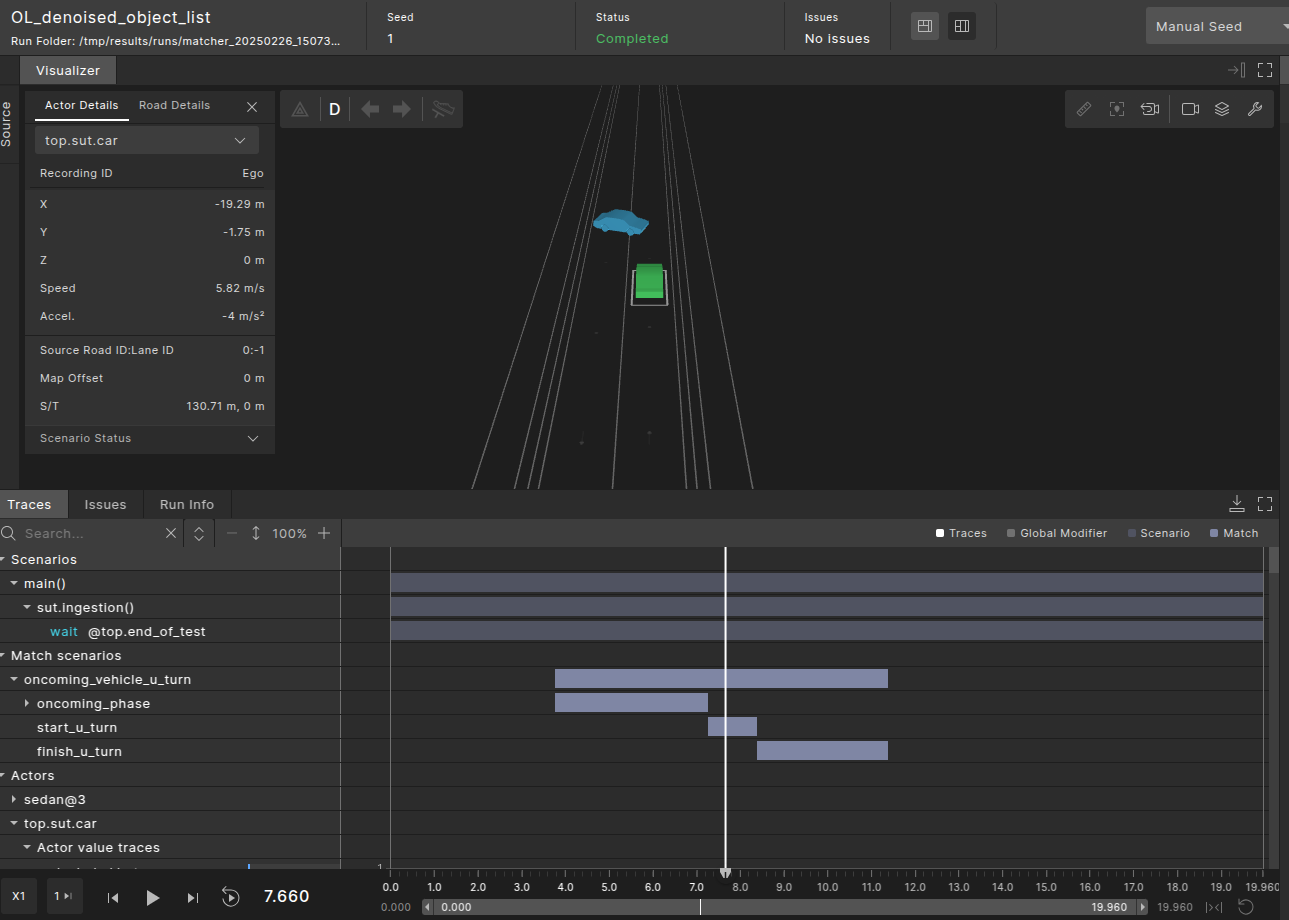
Use the single-run debugger to view the match intervals:
$FTX/bin/foretify --gui --load_run $MATCH_RESULTS
Generative test
In generative tests the process begins by launching Foretify with the --match flag, which triggers the compilation of both the active OSC and the monitoring OSC. Foretify then executes the scenario generation and runtime processes, after which the matcher performs scenario matching and collects coverage.
This combined flow simplifies the process by integrating matching within the Foretify execution.
Running the combined flow
To run the combined flow, copy and paste the following shell command, and replace <generative_scenario_filename> and <scenario_filename> with the actual filenames within the directories:
$FTX/bin/foretify \
--load $FTX/logiq/smoke/generative_test/<generative_scenario_filename>.osc \
--work_dir /tmp/results/ \
--match $FTX/logiq/smoke/generative_test/<scenario_filename>.osc \
--run \
--batch
$FTX/bin/foretify \
--load $FTX/logiq/smoke/generative_test/generative_vehicle_cut_in.osc \
--work_dir /tmp/results/ \
--match $FTX/logiq/smoke/generative_test/scenarios.osc \
--run \
--batch
Viewing generative smoke test results
The output of the combined flow is a run-results directory containing both the simulation and the matching results.
The run-results directory path is displayed on the screen. You can also capture it using the following shell command:
RUN_RESULTS=`ls -td /tmp/results/runs/* | head -1`
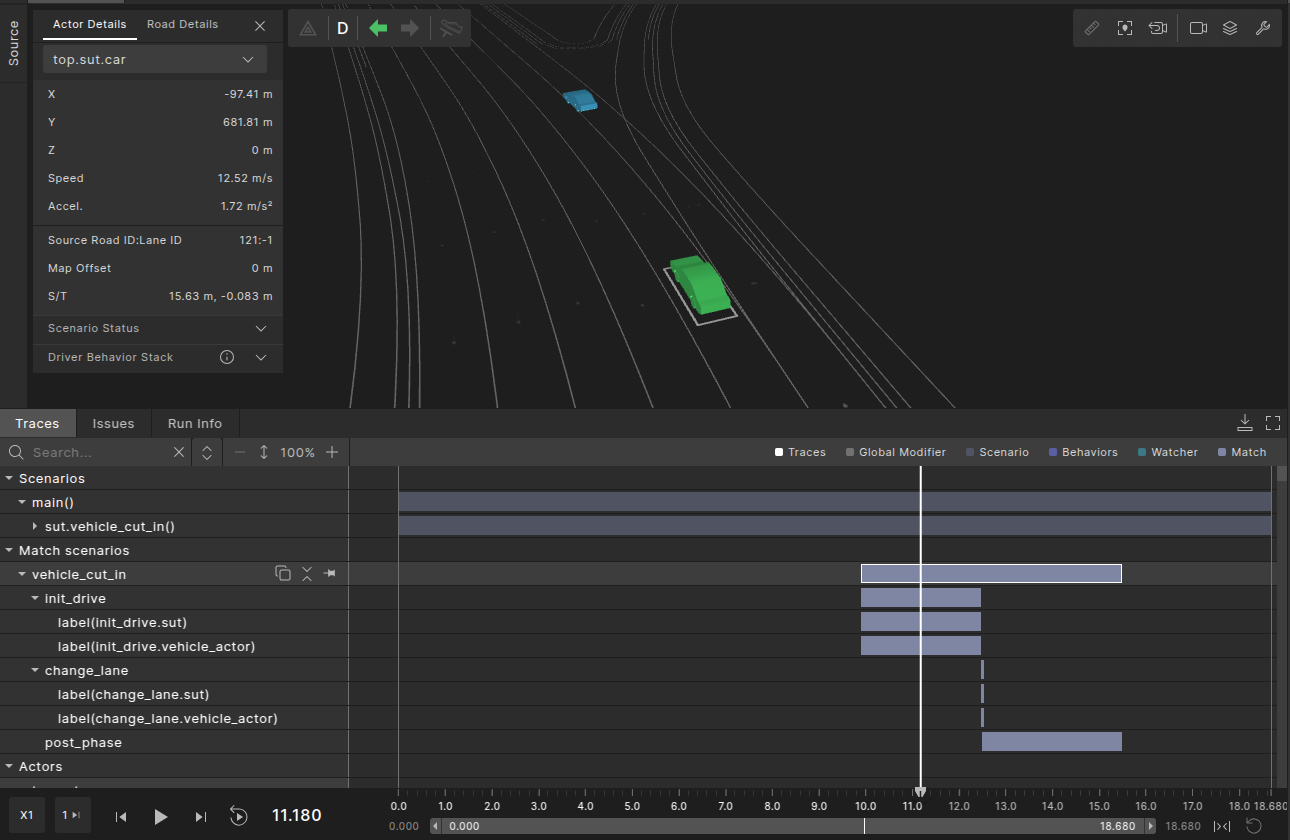
Use the single-run debugger to view the match intervals:
$FTX/bin/foretify --gui --load_run $RUN_RESULTS
The results include both the intervals created during generation (darker purple) and the match intervals (lighter purple).
Uploading results to Foretify Manager
Ensure that the Foretify Manager server can access the run directory path to invoke the single-run debugger.
Coverage data will still be available even if the path is inaccessible.
To upload any run-results directory to Foretify Manager, run the following command:
$FTX/fmanager/platform/manager-python-sdk/demo/upload_runs \
--user <USER>  \
--host <FMANAGER SERVER ADDRESS> \
--port 443 \
--https \
--runs_top_dir <RUN DIRECTORY PATH>
--project <PROJECT_NAME>
In the above command:
- The
--httpsargument is optional. Include it for servers that use HTTPS, and omit it for those that use HTTP. - Use
httpfor port 8080 andhttpsfor port 443.