Global checkers and metrics
Foretify provides various predefined checkers and metrics to help you determine whether the SUT is behaving as expected.
See also
Global metrics (records)
Global metrics are attributes that are collected for every run in a test suite. They help you analyze the test suite by providing specific global information, such as simulator and map versions. Foretify records the global metrics for each run, and once your runs are uploaded to Foretify Manager, you can access and analyze the global metrics.
These metrics are defined in a global information struct, g_info and collected in the <run-dir>/coverage/runtime_data.json file for each run.
In Foretify Manager, you can see the metrics for a test suite by clicking on the top.info node in the VPlan. For more information, see View global metrics.
You can also define custom global metrics. See Add global metrics for more information.
g_info
The g_info struct is defined as follows:
extend g_info:
    var run: run_info
    var sim: sim_info
    var model: model_info
    var frun: frun_info         # not currently used
model_info
The model_info struct is defined as follows:
struct model_info:
    var dut_name: string        # The name of the SUT used in the run
    set dut_name = "ftx_driver" # The initial value
    var dut_version: string     # The version of the SUT used in the run.
    set dut_version = "1.0"     # The initial value
    var foretify_version: string # The version of Foretify used in the run.
Foretify sets the SUT name and version based on the driver used to control the movements of the SUT:
- The ftx_driver (Foretellix Human Driver Model) controls both lateral and longitudinal movements of the SUT.
- The SUT_driver (the SUT) controls both lateral and longitudinal movements of the SUT.
- With a hybrid_driver, the Foretellix Human Driver Model controls either the lateral or longitudinal movements and the SUT controls the other.
You can override the default setting for the SUT name and version by extending the model_info struct like this:
extend model_info:
    set dut_name = "XYZ"
    set dut_version = "4.1"
sim_info
The sim_info struct is defined as follows:
struct sim_info:
    var connection_string: string   # The actual simulation connection string.

    var simulator_name: string      # The name of the simulator used in the run.
    var simulator_version: string   # The version of the simulator used in the run.
run_info
The run_info struct is defined as follows:
enum debug_mode: [
    none,            # No debug
    debug_record,    # Record mode (run simulation and record data)
    debug_replay     # Replay mode (no actual simulator)
]

struct image_info:
    var foretify_image: string
    var simulator_image: string
    var sut_images: list of string

struct package_info:
    pass

struct run_info:
    # Contains the path of the generated folder for the current run
    # Foretify overrides this field at the beginning of each test
    #
    var run_folder: string

    # Contains the debug mode
    # Foretify overrides this field at the beginning of each test
    #
    var debug_mode: debug_mode

    # If debug_mode == debug_replay, this field contains the replay folder
    # Foretify overrides this field at the beginning of each test
    #
    var replay_folder: string

    # Contain the seed of the current run
    # Foretify overrides this field at the beginning of each test
    #
    var seed: int

    # Contains the name of the test
    #
    var test_name: string

    # Contains the start time of the test
    #
    var start_time: string

    # Contains the path of the generated folder for the current build
    #
    var build_folder: string

    # Contains the names of docker images used in the current run
    #
    var images: image_info

    # Contains the versions of packages used in the current run
    #
    var packages: package_info

    def init() is also:
        images = new
Map checkers
When loading a map, the format of the map is checked. If any problems are detected, the map fails to load and you see a warning message:
"[0.000] [MSP] 56 map anomalies have been detected.
For details reload the map with debug verbosity"
The table below describes a few of the map checkers.
Info
You cannot configure or disable the map checkers. These anomalies make the map unusable for Foretify.
| Check type | Map type | Description |
|---|---|---|
| Maximum distance between connected lanes | All | For any two connected lanes, the distance between the end of the first lane and the start of the connected lane is measured. If the distance is above a predefined threshold, a warning message is issued. |
| Lane connectivity | All | If a road has one lane connected to another road and one lane with no connection, the distance between the disconnected lane to all lanes in the next road is checked. If the distance is close enough, a possible missing connection is reported. |
| Zig-zag | OpenDrive | Check whether the lane geometry creates a improbable change in the angle. |
| Sub-sections sum | OpenDrive | If a road is split into several sub-sections, check that the sum of the lengths of all sub-sections is equal to the length of the entire road. |
- The maps provided by Foretellix should load without error. If you encounter an error, notify Foretellix.
-
If you are loading a proprietary map:
- Run Foretify with --verbosity debug to see the full list of map anomalies.
- Refer to Map format requirements for information on how to fix the map.
Global checkers for physical objects
Foretify checks for faulty behaviors of physical objects, such as a collision with another object.
These checkers are encapsulated into a global modifier called global_checkers:
global modifier physical_object.global_checkers
Global checkers for vehicles
Foretify checks for different faulty behaviors of a vehicle, such as driving off the road or at an unreasonable speed.
You can change the default values of these vehicle checkers and also modify their severity level.
Junction checkers
The junction checkers are a collection of watcher modifiers instantiated under a global modifier that creates intervals for interesting situations, such as traversing a junction or approaching a junction with a stop sign, among others. During these intervals, checks (e.g., did the SUT stop before a stop sign?) are performed, and relevant metrics are collected.
sut_vehicle.junction_checkers
The sut_vehicle.junction_checkers is the top-level global modifier that instantiates junction-related modifiers.
    global modifier sut_vehicle.junction_checkers:
        watcher traverse_junction is traverse_junction(vehicle: actor)
        checker checker_approach_junction is approach_junction(traverse_junction)
Constraining its enabled field to false will disable the entire runtime functionality ('on @some-event' blocks) underneath, including instantiated modifiers such as traverse_junction and approach_junction.
    extend sut_vehicle:
        keep(junction_checkers.enabled == false)
traverse_junction
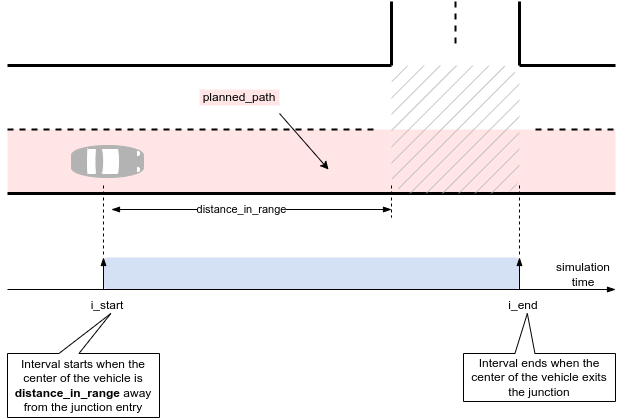
The traverse_junction is a watcher modifier that emits intervals when a vehicle traverses a junction.
| Checker attribute | Description |
|---|---|
| vehicle | The vehicle to monitor. |
| distance_in_range | Minimum distance at which the junction is considered in range, measured from the center of the vehicle. The default value is 50m. |
An interval will be emitted even when the vehicle is created inside a junction.
The example below depicts configuring the distance_in_range of the sut.car instance to 70m.
extend top.main:
    keep(sut.car.junction_checkers.traverse_junction.distance_in_range == 70m)
approach_junction
The approach_junction watcher modifier emits intervals that start when a vehicle is within a configurable distance from entering a junction and end when
- The center of the vehicle enters the junction, if no signals are present.
- The front of the vehicle passes by a stop sign, yield sign, or traffic light, if any of these signals are present.
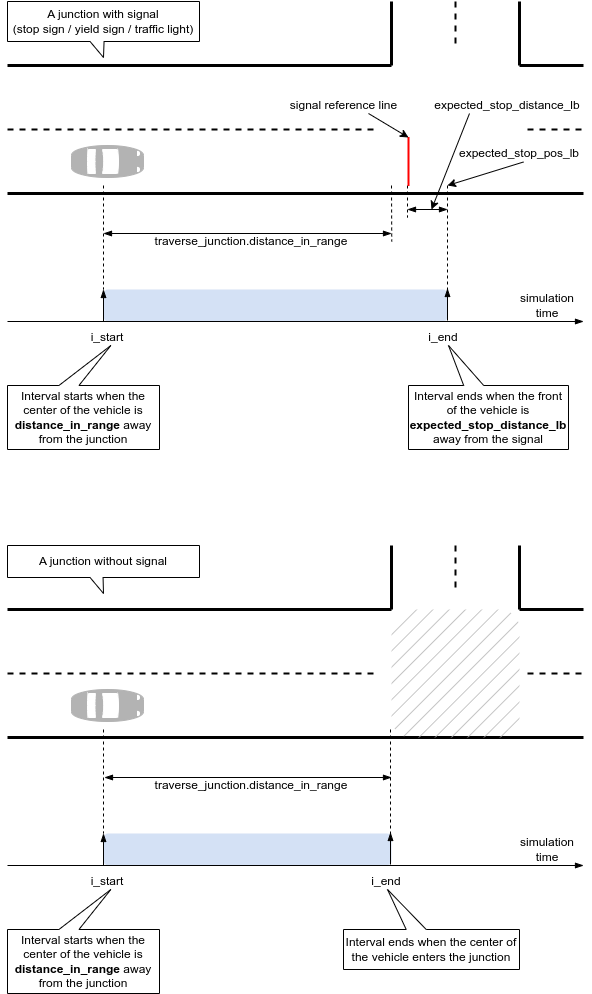
In the diagram above:
- The "signal reference line" corresponds to the relevant signal, whether it is a stop sign, yield sign, or traffic light.
- expected_stop_pos_lb indicates the position relative to the "signal reference line" where the checks are performed. This is configurable via expected_stop_distance_lb (refer to the next table).
| Checker attribute | Description |
|---|---|
| Parent object | approach_junction |
| Issue category | sut or other |
| Issue Kind | stop_at_sign, stop_at_flashing_red, stop_at_turn_on_red, stop_at_tl_not_working, run_yellow_light, run_red_light, about_to_run_red_light, slow_down_at_flashing_yellow, slow_down_at_yield |
| Default severity | error_continue |
| Trigger condition | See the description below. |
| Configuration Parameter | Handle to the traverse_junction watcher. approach_junction will monitor and check the behavior of the vehicle from traverse_junction. |
| Configuration parameter | expected_stop_distance_ub (default 3m) - Upper boundary of expected road distance to stop at a signal (measured from the front of the vehicle). It is relevant for a stop sign, flashing red traffic light, non-functional traffic light, and passing by a red traffic light and the turn-on-red rule applies. |
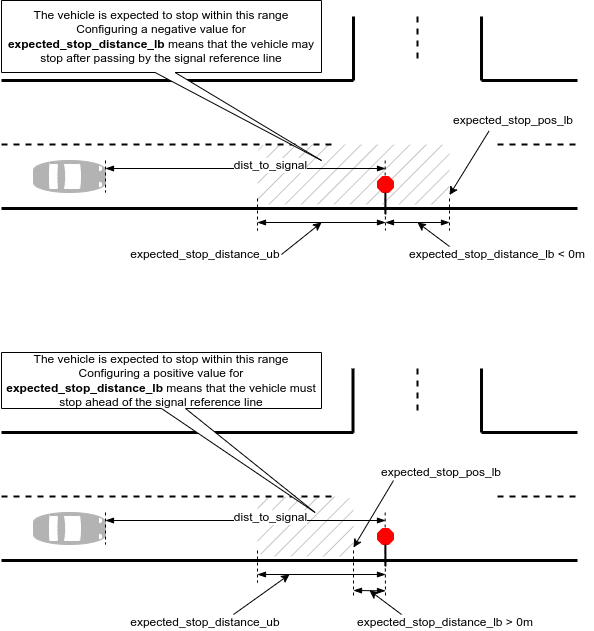
| Configuration parameter | expected_stop_distance_lb (default -0.3m) - The lower boundary of expected road distance to stop at a signal (measured from the front of the vehicle). A positive value means the front of the vehicle must stop before the signal. A negative value means the front of the vehicle may stop after passing by the signal. It is relevant for all checks. |
| Configuration parameter | expected_stop_min_duration (default 0.5s) - Minimum stopping duration at a signal. It is relevant for a stop sign, flashing red traffic light, non-functional traffic light, and passing by a red traffic light and the turn-on-red rule applies. |
| Configuration parameter | reaction_time (default 0.1s) - The delay after which the vehicle is expected to react to a traffic light changing from green to yellow. |
| Configuration parameter | deceleration_to_stop_at_yellow_start (default 2mpsps) - The minimum deceleration to react to a traffic light changing from green to yellow. It is used to determine whether a vehicle has enough distance to stop (completely). |
| Configuration parameter | deceleration_to_stop_at_red_end (default 4mpsps) - The deceleration threshold is used to check the vehicle has enough distance to stop (completely) when the traffic light changes from red to green. |
| Configuration parameter | slow_down_rate (default 50) - The percentage from the maximum allowed legal speed that a vehicle is expected not to exceed when entering a junction with a yield sign or flashing yellow traffic light. |
| Configuration parameter | min_distance_to_signal (default 20m) - Minimum distance to the signal at which checks will be performed. It is relevant in two situations: (1) The spawning position of the vehicle. (2) A traffic light changing its mode of operation (e.g., turning on/off). |
| Configuration parameter | min_time_gap_to_signal (default 3s) - Minimum time gap to the signal at which checks will be performed. It is relevant in two situations: (1) the spawning position of the vehicle. (2) A traffic light changing its mode of operation (e.g., turning on/off). |
The approach_junction watcher holds the handle to the traverse_junction watcher modifier to determine when to start the intervals. It must be instantiated as a checker and has an approach_junction_data (inheriting any_watcher_data) associated with it.
The watcher modifier will perform checks (whether the vehicle stops, remains stopped, or slows down when it should) if either a stop sign, a yield sign, or a traffic light is present at the junction entry. It does not deal with the right-of-way.
The watcher modifier supports the following modes of operation of a traffic light:
- flashing red
- flashing yellow
- not working (either off or malfunctioning)
- regular red/yellow/green functionality
- Transition between any modes mentioned above, for example, changing from regular red/yellow/green to off, changing from regular red/yellow/green to flashing yellow, and changing from off to flashing red, and other similar changes.
The checks will not be performed if:
- The vehicle is created in the simulation too close to the signal (either the distance is less than min_distance_to_signal or the time gap is less than min_time_gap_to_signal).
- A traffic light changes its mode of operation when the vehicle is too close to it (either the distance is less than min_distance_to_signal or the time gap is less than min_time_gap_to_signal).
When the vehicle approaches one of the following:
- A stop sign
- A flashing red traffic light
- A non-functional traffic light
- A regular red/yellow/green traffic light, where the vehicle intends to turn right, and the light is red.
...and the road distance from the front of the vehicle to the reference stop line (denoted as dist_to_signal in the following figure) is less than expected_stop_distance_lb (i.e., the front of the vehicle passes the expected_stop_pos_lb), the modifier will check whether the front of the vehicle stops for at least expected_stop_min_duration within the range [expected_stop_distance_lb..expected_stop_distance_ub].
Here, "the vehicle has stopped" means the vehicle.is_standing_still() method returns true for consecutive simulation steps equal to expected_stop_min_duration.
If the check fails, the checker will raise an issue with the kind stop_at_sign, stop_at_flashing_red, stop_at_turn_on_red, or stop_at_tl_not_working:
SUT error (stop_at_flashing_red): <sut_vehicle@3377 (top.sut.car) red uid:10> - SUT - ftx_driver was in control: Vehicle did not stop for 0.50second within [-0.30meter..3meter] from the flashing red traffic light.
As a matter of principle, when approaching a regular red/yellow/green traffic light and the light changes from green to yellow, the checker assumes that the vehicle will start decelerating constantly by some comfortable threshold. When the vehicle passes by the traffic light and the light is either yellow or red, the checker will raise an issue provided that the vehicle could have stopped:
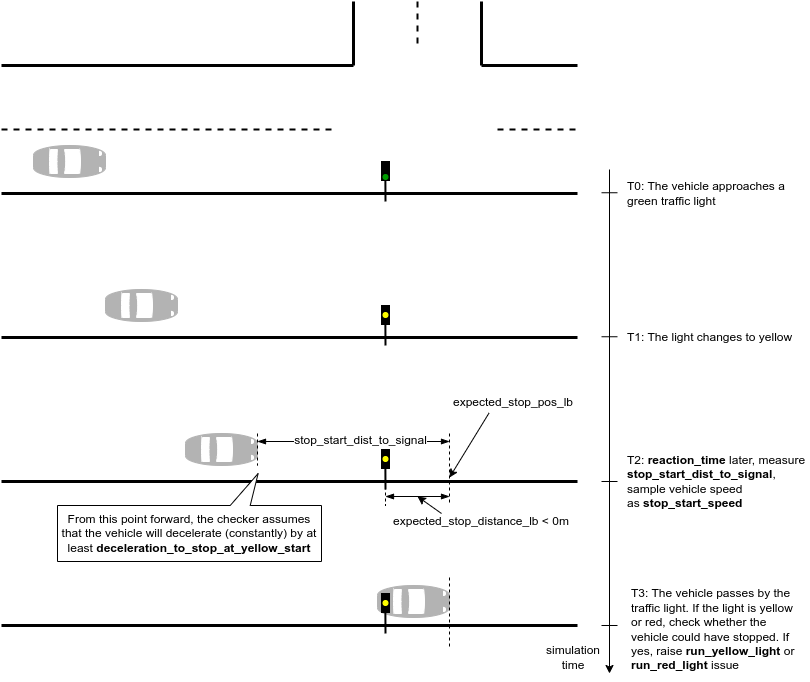
The procedure is as follows:
- The reaction_time after the light changes from green to yellow:
- Measure the distance from the front of the vehicle to the traffic light - stop_start_dist_to_signal.
- Sample the speed of the vehicle - stop_start_speed.
- Compute the distance to full stop assuming a constant deceleration of deceleration_to_stop_at_yellow_start.
    stop_start_dist_to_full_stop = (stop_start_speed * stop_start_speed) /
                                 (2 * deceleration_to_stop_at_yellow_start)
- When the front of the vehicle passes by the expected_stop_pos_lb and the light is either yellow or red, check whether the vehicle could have stopped:
if yes, raise either run_yellow_light or run_red_light issue:
stop_start_dist_to_full_stop < stop_start_dist_to_signalSUT error (run_red_light): <sut_vehicle@4911 (top.sut.car) red uid:17> - SUT - ftx_driver was in control: Vehicle is running a red light although it could have stopped - the light changed from green 9second ago. 0.10second (reaction time) later, the vehicle was 49.40meter away from the traffic light (accounting also for expected_stop_distance_lb of -0.30meter), driving at 6.96mps (S). Assuming a constant deceleration of 2mpsps (D), it would have stopped in 12.11meter ( S^2 / (2 * D) )
There are situations where passing by a green traffic light may not be ideal. For instance, consider a scenario where the vehicle passes a green light that turned from red to green only 0.1 seconds ago (a short time ago) while traveling at a speed of 50 kph. The vehicle was on the verge of running a red light. In such cases, the checker will raise an issue if the vehicle cannot be stopped:
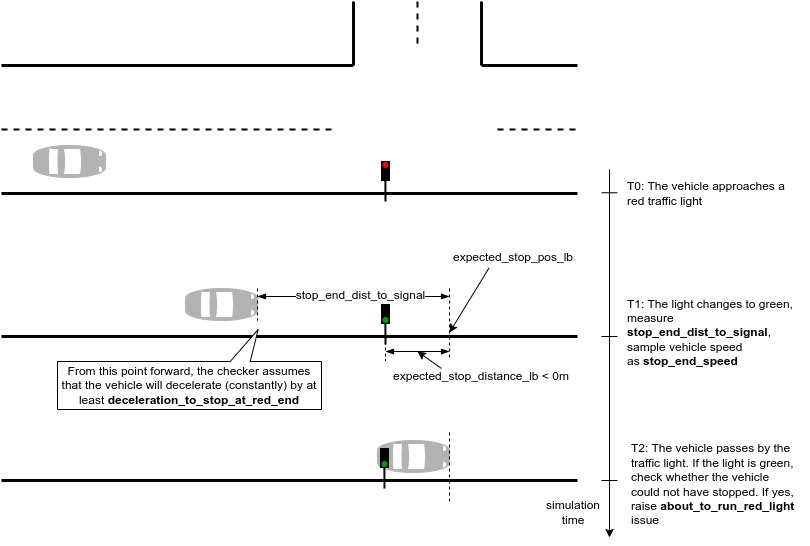
The procedure is as follows:
- When the light changes from red to green:
- Measure the distance from the front of the vehicle to the traffic light - stop_end_dist_to_signal.
- Sample the speed of the vehicle - stop_end_speed.
- Compute the distance to full stop assuming a constant deceleration of deceleration_to_stop_at_red_end.
    stop_end_dist_to_full_stop = (stop_end_speed * stop_end_speed) /
                               (2 * deceleration_to_stop_at_red_end)
- When the front of the vehicle passes by the expected_stop_pos_lb and the light is green, check whether the vehicle could not have stopped:
if yes, raise about_to_run_red_light issue:
stop_end_dist_to_full_stop > stop_end_dist_to_signalSUT error (about_to_run_red_light): <sut_vehicle@1744 (top.sut.car) red uid:10> - SUT - ftx_driver was in control: Vehicle was about to run a red light despite the fact that the light is green - the light changed to green 0.92second ago. The vehicle was 7.29meter away from the traffic light (accounting also for expected_stop_distance_lb of -0.30meter), driving at 7.35mps (S). Assuming a constant deceleration of 2mpsps (D), it would have stopped in 13.50meter ( S^2 / (2 * D) )
When the vehicle approaches a yield sign or a flashing yellow traffic light and the front of the vehicle passes by the expected_stop_pos_lb, if the speed of the vehicle is greater than maximum legal speed multipled by slow_down_rate, then the checker will raise an issue with the kind slow_down_at_yield or slow_down_at_flashing_yellow:
SUT error (slow_down_at_yield): <sut_vehicle@435 (top.sut.car) red uid:14> - SUT - ftx_driver was in control: Vehicle is passing by a yield sign at 9.17mps which is bigger than 50 percent of road's legal speed 17.88mps
Configure the check to expect the vehicle to stop at least 1m ahead of the signal.
extend top.main:
    keep(sut.car.junction_checkers.checker_approach_junction.expected_stop_distance_lb == 1m)
For more information, see Complete example.
Freeze the modifier at runtime:
extend sut_vehicle.junction_checkers:
    on @start:
        override(checker_approach_junction, run_mode: freeze)
For more information, see Complete example.
Vehicle policy: max_road_offset checker
Checks if the center of the vehicle goes off the road by more than the distance specified by vehicle.policy.max_road_offset.
The text of the error is in the following format:
<vehicle details>: Vehicle position is too far off planned path. Position: [<lane position>], Global coordinates: [<global position>]
This check may disabled by setting policy.enable_off_planned_path_check to false.
| Checker attribute | Description |
|---|---|
| Parent object | vehicle |
| Issue category | other |
| Issue Kind | off_planned_path |
| Default severity | error |
| Trigger condition | The vehicle goes off the road by more than the distance specified by (lane_width/2 + policy.max_road_offset). |
| Configuration parameter | policy.enable_off_planned_path_check (default: true). |
| Configuration parameter | policy.max_road_offset (default: 20m). |